Opening a Saved Resume by URL in the Enterprise Editor
 Gowri Shanker·Sep 23, 2026
If you came here expecting something enterprise-specific, I should say up front that this path mostly isn't. The code that turns /enterprise/editor/123 into a filled-in form is the same method the consumer editor runs, with no enterprise branch inside it. A few things around it do differ, and one of them is worth knowing before you use it: pressing Save on a resume you opened by id writes a second resume instead of updating the one you opened. I read the code on 20 September 2026, and everything below comes from that read.
Key takeaways
- The id in the URL is a saved resume's row id. The server works out who you are from your session token and refuses the row if it belongs to someone else.
- While the resume loads you get the app's blocking spinner. It carries no text.
- The Edit button on My Resumes is the only thing in the enterprise portal that sends you here with an id.
- Limitation: Save inserts a new draft row and leaves the row you opened untouched, so editing a resume gives you two.
- Limitation: the template is not restored along with the content, so the preview comes back in the
lattetheme until you pick a template again.
What the id in the URL actually is
It is the database id of a saved resume, the same number My Resumes prints in its Resume column. On arrival the editor reads the id route parameter. With no id it stops right there and you get the blank editor that the create button opens.
With an id, it opens the global loader, fetches that row's saved form values, patches them into the form, renders the preview and moves the editor to its second step. So you land in the form itself rather than on the template picker.
Fresher or experienced is decided by the saved data, not by what you picked last time. If the loaded values carry a total-experience figure or at least one work entry, the editor switches to the experienced layout. Otherwise it switches to the fresher one.
Whose resume can you open?
Only your own. The fetch goes to a shared endpoint that accepts either a consumer or an enterprise session token, and the user id is resolved from that token on the server. The browser never sends an identity of its own, so there is nothing in the URL to tamper with except the number.
Three checks then run in order on that number. An id the server cannot read as a positive number comes back 400 with Invalid resume id. Trailing characters are ignored, so 41abc is read as 41. A number with no matching row comes back 404 with Resume not found. A row that exists but whose owner is a different user comes back 403 with Forbidden.
That last check compares one user against one row. It does not consult an organisation, a batch or a role. So the answer to what an admin or a moderator sees at this URL is short: the route's role check turns them away first (I wrote about the guards in the post on the enterprise editor route), and if you took the route out of the equation entirely, an admin's token asking for a student's row would still get the 403.
What loading and failure look like
The loading state is the app-wide overlay: a spinner with no text and no progress, sitting over the page so you cannot type into a form that is still filling itself in. It closes whether the fetch worked or not.
 Both messages after a failed load, with the "+1 more" control pressed.
A failure pushes two entries, and the bar only shows you the newer one. What you read is the editor's own line: "Could not load the saved resume. Please try again." Next to it is a +1 more control; open that and the server's own message is there too, so on a bad id you get Resume not found. Behind both, the form is still blank and still editable.
Offline is the state I like least. The editor checks connectivity before it fetches anything, so an offline visit to an /editor/:id URL fires the toast "You're offline. This action will be available once you reconnect." under the heading "No Internet Connection", then leaves you sitting in an empty editor with no message bar entry and nothing tying that toast to the resume you were trying to open.
Getting here with an id at all
One button does it. Edit on a row in My Resumes navigates to /enterprise/editor/ plus that row's id, and its label flips to "Opening…" while it goes. It is disabled when the membership check has come back inactive. The + Create a resume button at the top of the same page carries no id, which is why it gives you an empty form.
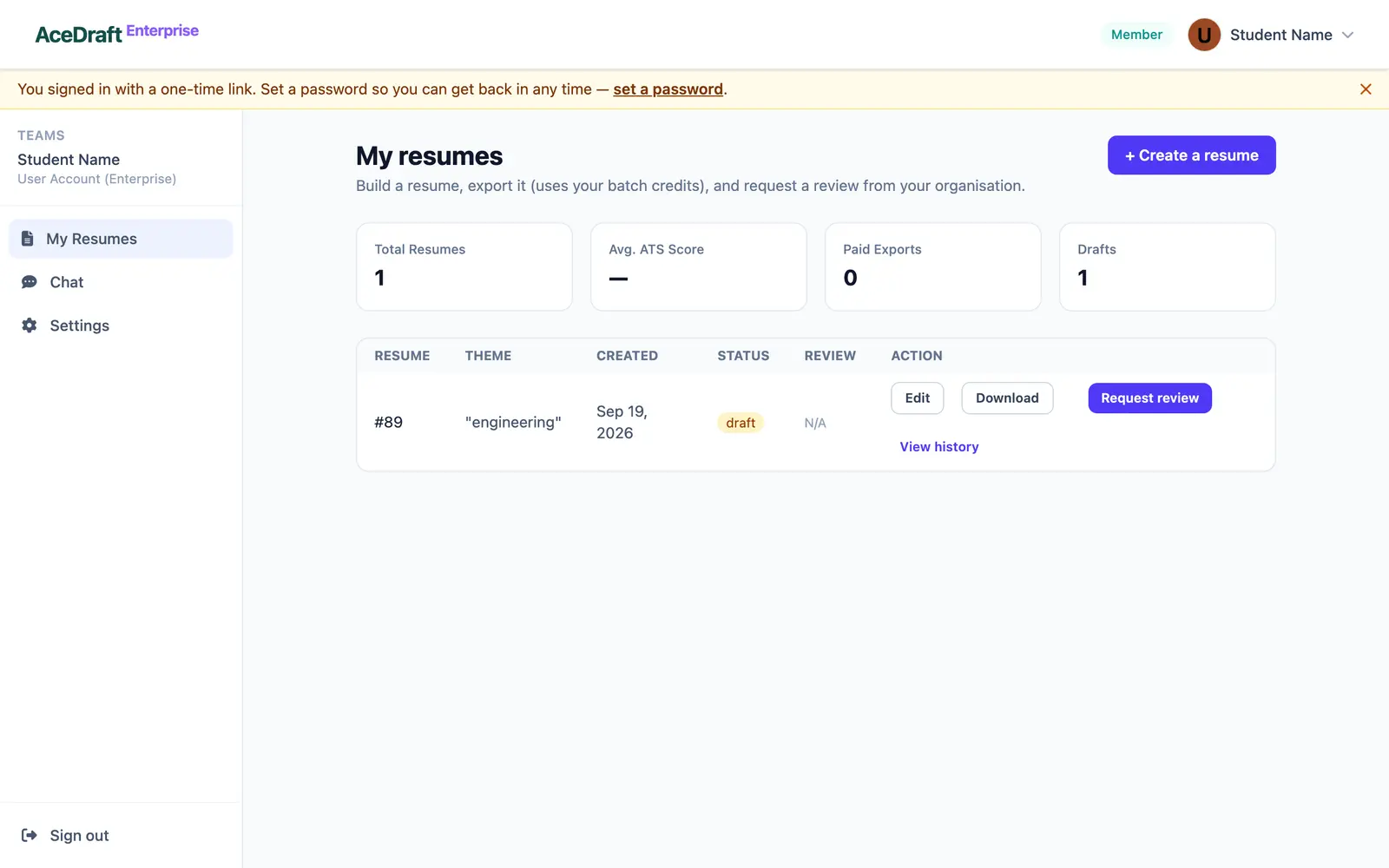 The Edit button on a My Resumes row is what opens the editor with that resume's id in the address.
Why Save leaves you with two resumes
The save payload includes the form values, the rendered HTML and the theme name. What it never includes is the id you opened. The endpoint on the other side is perfectly capable of updating a row in place, and it does that when an id arrives, which is how the export page finalises a draft it just created. The editor simply never supplies one. So an edit of resume 41 lands as a brand new draft, and 41 stays exactly as it was.
The template goes the same way. My Resumes clears the stored theme and template keys when it loads, the id fetch does not restore them from the saved row, and the preview falls back to the latte theme. Use Change Template in the editor toolbar to pick one again before you save, or the new row is stored without a theme name of its own.
Use this if you want to carry an old resume's content into a new version and keep the old one. That is what this flow is actually good at today.
Skip this if you wanted to correct a typo on a resume you already exported. Opening it by id and saving will not touch that resume.
Related pages
Comments
No comments yet. Be the first to comment.