Exporting Your Resume from AceDraft: PDF and What It Costs
 Gowri Shanker·Sep 29, 2026
You can build and preview a resume in AceDraft without paying. On the signed-in export page, the file is the paid part and it comes out as a PDF only. If a plain-text ATS PDF is enough, the guest editor gives you one free: save your resume there and the next page offers it with no sign-up and no payment. A Word (DOCX) option exists in the code, but it's switched off, so don't go looking for it.
One more thing before you trust this page. I captured it on an account with lifetime export credits, so I never saw the pay button or the payment window. Those parts come from reading the code, and I've marked them.
Key takeaways
- You can't type this page's address and land on it. With no resume staged, you're sent back to your dashboard.
- PDF is the only format on the page.
- The preview is free. The file from this page needs a payment, or a lifetime export credit if your account has them. The free plain-text PDF comes from the guest editor instead.
- Limitation: I saw the credit route, not the payment route. The payment route is from the code.
Prerequisites. You need to be signed in and to have a resume ready. You arrive from the editor's Save button, or from Export PDF on a Draft resume's detail page.
Why does this page send me back to the dashboard?
Because it has nothing to export. The page reads the resume your browser is holding, and if that's empty it shows “No resume was selected.” and takes you to your dashboard. I read that in the code on 19 September 2026. It's why opening this page's address with no resume staged just bounces you.
The same logic explains a related habit: opening your dashboard clears the staged resume, so a half-finished export doesn't follow you around.
Which formats can I export?
PDF, and only PDF. On 16 September 2026 the Select Format card showed one option, PDF Document. The code has a second option for a Word file, described as editable in Word or Google Docs, but it sits inside a comment and never renders.
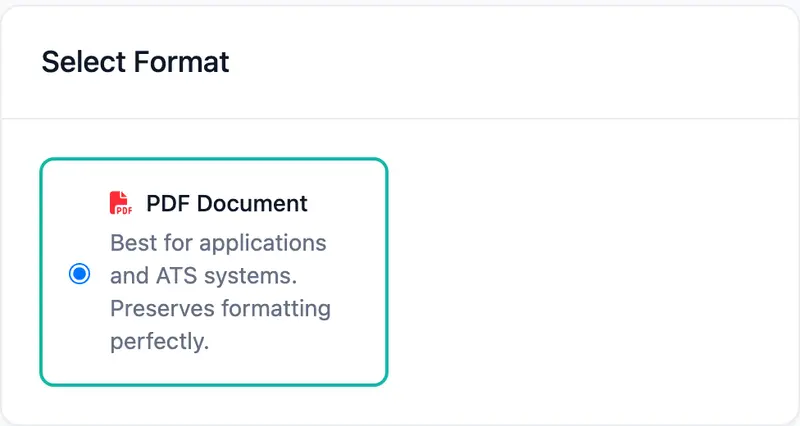 One format on 16 September 2026. If you need a DOCX, this page can't give you one.
Can I download my resume without paying?
Yes, from the guest editor. This page, the signed-in export page, always needs a payment or a credit. Here you can build a resume and see the full preview below the format card without paying, but the download needs a payment or, on accounts that have them, a lifetime export credit. The page describes it as one payment per resume, with no subscription and no auto-renew. The free route is the guest editor: save your resume and the next page offers an ATS-ready plain-text PDF with no sign-up, no payment and no watermark. It comes without the template's design.
What you pay depends on where you are, so I'm not printing a number. It would be wrong for most readers. The Order Summary shows the amount for your region, and the page says that amount is exactly what you pay.
On a payment account, the button reads Pay followed by that amount. It opens a payment window from Razorpay, the payment provider. I haven't opened it, and that's deliberate: it's a live merchant account, and opening it creates a real order.
What do lifetime export credits change?
They swap the pay button for a credit button. On 16 September 2026 my account had credits, and the Order Summary showed a Remaining Lifetime Exports box above a black Use 1 Credit & Export button. Accounts without credits see the pay button instead.
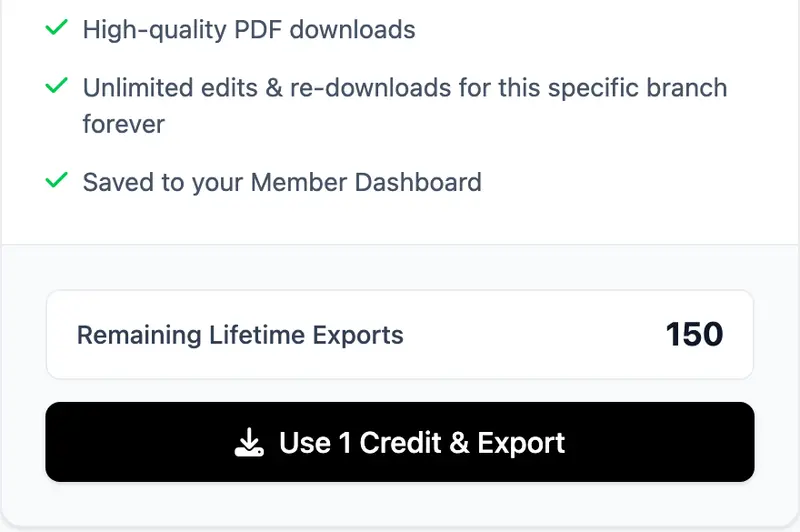 The item and price row above this is cropped out on purpose.
I never pressed that button, because it would have spent one of a real account's credits. From the code: a confirmation box asks before a credit is used, and the box shows how many you have left. When the count hits zero, the page offers two Booster Packs, A and B, priced in your currency. Their credits arrive a moment after the charge, not the instant you pay.
What happens after I pay?
Also from the code, not from watching it. A success screen says your download starts automatically and gives you a Download PDF button, and your resume stays in your dashboard for re-downloading. The staged resume is cleared once the export finishes.
If a payment fails, a failure screen offers Try again, a way back to your dashboard, and a payment link you can use later.
What doesn't this page do yet?
| You might expect | What's there |
| A Word (DOCX) file | Switched off in the code. PDF only. |
| A price on this page's tutorial | None here. It changes by region, so read it off your own screen. |
| The payment window | Not seen. Read in code, never opened, because it's live. |
| The credit export | Button seen, never pressed. It spends a real credit. |
| The success screen | Not seen. Described from the code. |
Author's take. The Booster Pack buttons show only a currency and an amount, not the label the server sends. Some labels carried their own export count, and it clashed with the number my screen already showed. That's the kind of bug you only meet with real data, and I'd rather show less than show two numbers that disagree.
Use this if you have a resume you're happy with and want the PDF, and you're fine paying per resume or spending a credit.
Skip this if you need a Word file. It isn't offered here. Skip it too if a plain-text PDF is all you need, because the guest editor gives you that free.
To get the file out of the editor itself, read save your resume as a PDF from the AceDraft editor. For how AceDraft charges, read a resume builder without a subscription.
Comments
No comments yet. Be the first to comment.