The Resume Detail Page: Score, Keywords and What to Do Next
 Gowri Shanker·Sep 29, 2026
This is the page you land on when you open a saved resume, and it has one button that doesn't do what its label says. On a Draft resume, Export PDF doesn't give you a PDF. It sends you to the export page, without a word of explanation. I'll say why below, along with what the rest of the page shows.
Key takeaways
- You get here from a resume card or a Recent Activity row on your dashboard. Every resume gets the same page with its own values in it.
- The ATS Match Score is a saved number. Opening the page doesn't scan anything.
- Branch for New Job, Open in Editor and Export PDF are the three things you can do from here.
- Limitation: Export PDF on a Draft is a silent redirect to the export page.
How do I get to a resume's detail page?
Open the resume from your dashboard, either with the Open link on its card or by clicking its row in Recent Activity. Both land here. The breadcrumb at the top reads Dashboard, then My Resumes, then the resume's title.
 The red button is the one to read twice. More on it in a moment.
What does the page show about my resume?
Eight things, and a few of them have catches. Both the catches and the fields are in one table so you don't have to hunt for the bad news:
| Field | Where it comes from, and the catch |
| Title | The desired position from your form, then your full name, then “Untitled Resume”. If you never filled in a role or a name, that's what you'll see. |
| Company | Only the company you typed for the job you're applying to. If that's blank, the line is missing. The dashboard card falls back to your first employer and this page doesn't. |
| Draft or Paid pill | Paid once the resume's export has gone through on the export page. Draft until then. |
| Edited time | When the resume was last changed, shown as a relative time. |
| ATS Match Score | The score saved with the resume. Shown only if one exists. The bar is green from 80 up and amber below that. |
| Template | The name of the template the resume uses. The row is hidden if no template name is stored. |
| Target Role | The same text as the title, so it follows the same fallback. With no desired position it shows your full name, or “Untitled Resume”, under a label that says Target Role. |
| Matched Keywords | Chips for the keywords saved with the resume. The whole row is hidden when there aren't any. |
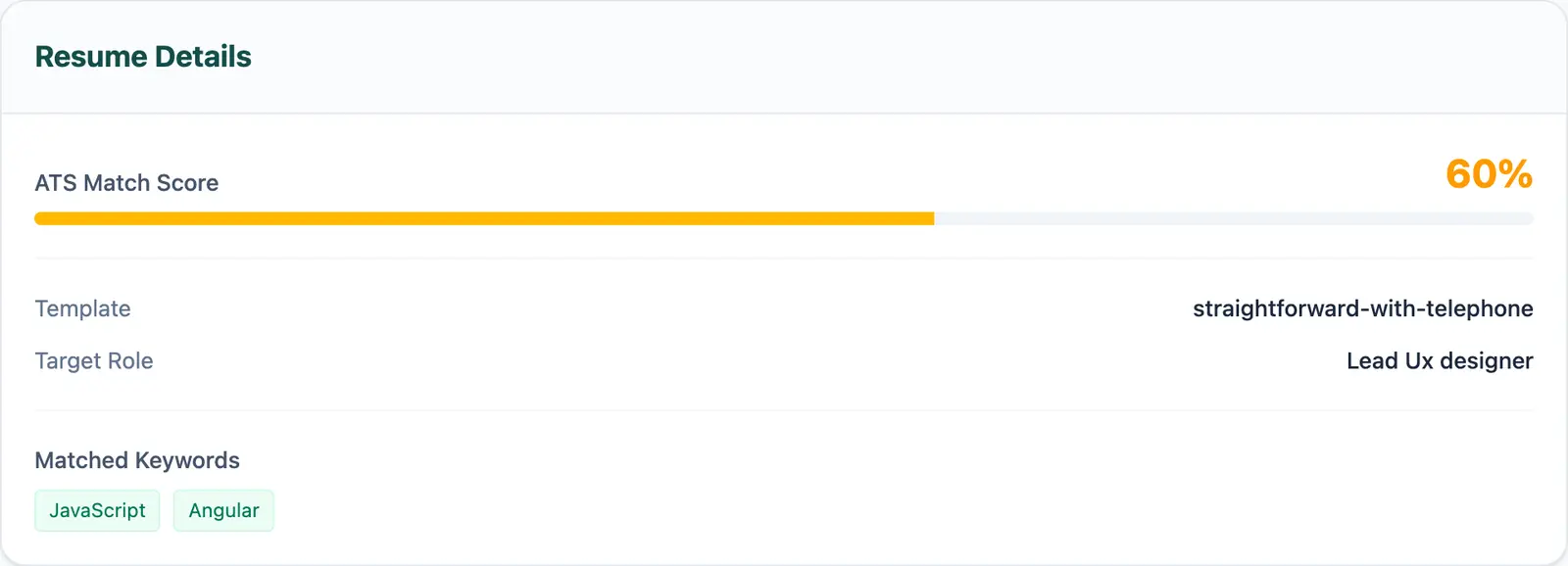 On 16 September 2026 my test resume showed two keyword chips. Yours may show none, and then the row won't be there.
Is the ATS Match Score a fresh scan?
No. It's read from the scan data saved with the resume, and opening this page never runs a new one. I haven't traced when that saved score was last worked out, so don't treat it as today's number.
The score is AceDraft's own, so read it alongside what the ATS score does and doesn't measure. The keyword chips come from the same saved data.
What do the three buttons do?
Branch for New Job takes you to the form for tailoring this resume to another posting. Open in Editor loads the resume into the editor. Export PDF depends on the pill next to the title.
A Draft is unpaid, and this page won't export an unpaid resume. So Export PDF stages your resume in the browser and sends you to the export page. On 16 September 2026 I clicked it on a Draft and watched it happen: the jump was immediate and no message appeared. The code does push a payment-not-made message first, but the page reloads straight away and wipes it, and a comment in the code says as much.
On a Paid resume, the code builds the PDF on this page without visiting the export page, unless the resume has no exportable content, in which case it stops with an error message. I haven't seen that happen, because my test resume was a Draft, so treat it as what the code says. Getting the file out as a PDF covers the export side.
What doesn't this page do yet?
| You might expect | What's there |
| A list of earlier versions of this resume | Nothing. I looked on 16 September 2026 and found none. |
| A fresh score when you open it | No, only the saved one. |
| An explanation when Export PDF redirects a Draft | No, the redirect is silent. |
| A company line when you left the job's company blank | No, the line is dropped. |
Author's take. I'd rename Export PDF on Drafts, or show the reason when the export page opens. A button that promises a file and hands you the export page is a bad trade, and I built it. Everything else on this page is a readout, which is why it's short.
Use this if you're deciding whether to edit, branch or export a resume you've already saved.
Skip this if you already know you want to export a Draft. The button only forwards you to the export page.
Comments
No comments yet. Be the first to comment.