The AceDraft Creator Program: What It Pays and Who Should Skip It
 Gowri Shanker·Sep 29, 2026
The AceDraft Creator Program does not pay money. The page says so itself: “No cash, no invoices, just credits you can use yourself or give away.” Those are free lifetime resume-export credits. If you need a rate card and a bank transfer at the end of it, close this tab and go pitch someone with a media budget.
I read this page's code on 20 September 2026 and photographed it running on my own machine the same day. The numbers in that screenshot are the ones my stack happened to be configured with, which matters more than it sounds.
Key takeaways
- Payment is export credits. Not money.
- Three tiers: a social post or public mention, a newsletter feature, and a dedicated blog review or video tutorial.
- Every number on the page, including whether applications are open, comes from one config row.
- Limitation: those numbers only arrive once the page loads in your browser, so a crawler or a failed request sees a headline, a button, and nothing in between.
- Limitation: the creator area has payout pages. They belong to a different program.
Prerequisites. To read /creators, nothing. To apply, an AceDraft account you can sign in to with Google. The apply page shows a sign-in prompt first if you don't have one.
1. Is the program open right now?
Look for an amber line above the tier cards reading “Applications are temporarily paused — check back soon.” It's a flag on the config row, flipped by AceDraft. While the page is still fetching, you get “Loading tiers…” instead.
If it's showing, don't bother with the form. The Apply Now button still takes you there, but the server turns the application away with a message saying the program is paused for new applications. Letting you fill in a form that can't be accepted is a rough edge I'd rather not have shipped.
2. What do the three tiers give you?
Credits, in increasing amounts, for increasing effort. Tier 1 is a social post or a public mention. Tier 2 is a newsletter feature. Tier 3 is a dedicated blog review or a video tutorial.
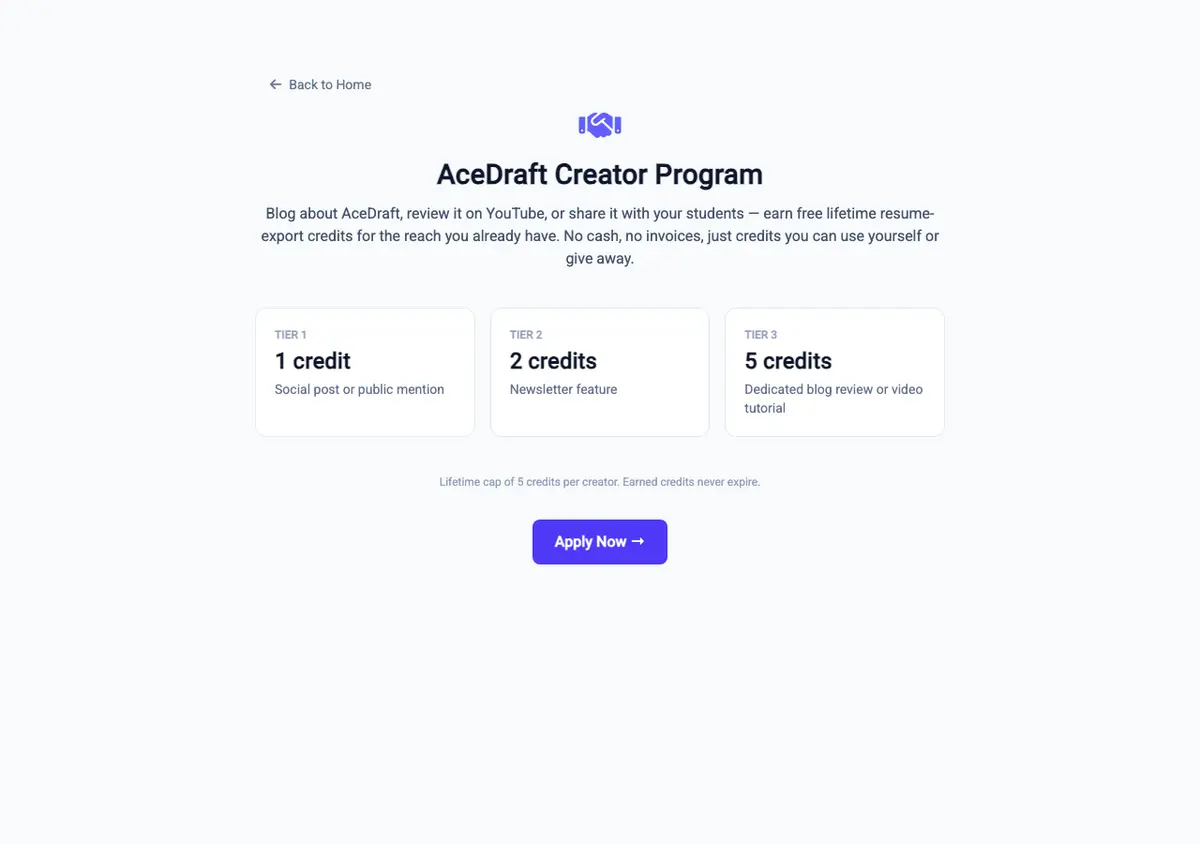 The page as it loaded on my own machine on 20 September 2026. The amber “applications are paused” line would sit directly above the cards if the config row said so; here it doesn't.
Here's why that matters. The three credit amounts, the lifetime cap per creator, and whether credits expire are all read from one config row by a public endpoint the page calls as it loads. On 20 September 2026 my stack served 1, 2 and 5 credits, a lifetime cap of 5, and “Earned credits never expire.” Edit the row and the page says something else. Read the numbers off the live page, not off me.
That small grey line under the cards is a two-way branch. Either earned credits stay valid for a set number of months from the date they're granted, or they never expire. Same row decides, and there is no third option in the code.
3. How do you apply?
The Apply Now button at the bottom goes to /creators/apply. The back arrow at the top goes to the home page.
On the form you pick a platform from a list, paste your channel address, clear a bot check and tick a box agreeing to the Partner Program Terms. The box is not optional; the server rejects the application without it. I'm not summarising the terms here. They're linked from the form.
After that, AceDraft reviews it. The rest is handled internally, and the form tells you where you stand when it comes back.
4. So why are there payout pages?
Because an approved creator also gets a referral link, and referral rewards are a separate thing from creator credits. The creator dashboard shows that link next to your credit totals, along with links to payout details and payout history. Both are the same pages the Refer and Earn area uses.
So the landing page is telling the truth. Creator tiers pay credits and only credits; the money-shaped pages belong to the referral program you also get access to. I couldn't tell from the dashboard alone, and it's on my list.
What this doesn't do yet
| You might expect | What the code does |
| Tiers visible to a crawler, or when the request fails | The config call only runs in the browser, so the prerendered page ships without tiers, and a failed call leaves the gap empty with no error message. |
| A paused program to block the Apply button | The banner appears. The button still navigates, and the refusal comes from the server. |
| Cash, once you see payout pages in the portal | Creator tiers pay export credits. Those pages serve referral rewards. |
| An estimate of what your audience is worth | Nothing here does that, and the program has no history to base one on. |
Author's take. The honest version: I have no marketing budget, you have an audience, and the only currency I can mint at will is credits in my own product. Fair trade for a teacher handing exports to a class. Not a fair trade for a professional reviewer, and dressing it up as one would waste both our afternoons.
Use this if you already write or record about careers and resumes, and free export credits are worth something to you or to the people you teach.
Skip this if you price your work in money. Nothing on this page turns into a payment for the tiers.
Related
Comments
No comments yet. Be the first to comment.